 Amsterdam




You want fine control
3X-UI gives you a web panel for managing inbound connections and users by hand.
Run your own proxy on a dedicated IP address, managed from a panel or set up for a single app such as Telegram.
from$5.52/mo
$11.04/mo when billed monthly.
Each page has plans and setup details.
Work back from who will connect, and how.
3X-UI gives you a web panel for managing inbound connections and users by hand.
Hiddify focuses on easy onboarding, with several protocols behind one panel.
MTProxy does one job and is the most direct way to proxy Telegram.
Three different levels of scope.
| 3X-UI | Hiddify | Telegram MTProxy | |
|---|---|---|---|
| Scope | General proxy panel | General proxy panel | Telegram only |
| Web panel | |||
| Multiple protocols | |||
| Per-user management | Limited | ||
| Best for | Hands-on admins | Sharing with less technical users | Telegram communities |
Practical hosting guides and server tips, newest first.
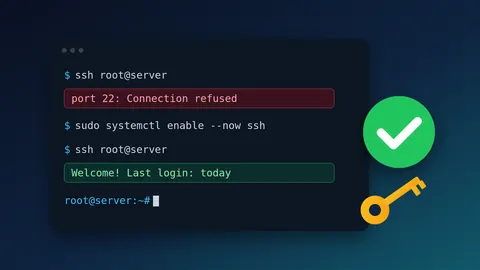
Can't SSH into your server? Whether you get "Connection refused" on port 22, a timeout or "Permission denied (publickey)", here's what each error means and how to fix it in a few minutes, even when you're locked out.

Your site shows "502 Bad Gateway" and nothing else. Here's how to read the Nginx error log, find out why the app behind it stopped answering, and fix the most common causes on WordPress, PHP-FPM, Node.js and Docker.

Your server suddenly can't save files, install updates or keep its database running. Here's how to find what filled the disk, free space safely in a few minutes, and stop it from happening again.
Short answers to common questions.
A VPN usually carries all device traffic through an encrypted tunnel. A proxy typically carries traffic for chosen apps, and panels like these often support protocols designed to blend in.
Choose 3X-UI for fine control over inbound connections and users, Hiddify for easier sharing with less technical people, and Telegram MTProxy if you only need Telegram to work. 3X-UI and Hiddify are general proxy panels with several protocols, while MTProxy does one job with no panel. Each has its own proxy VPS page.
Yes. On a 3X-UI VPS the panel is installed in Docker with an HTTPS certificate, on a Hiddify VPS Hiddify Manager is ready for you to finish setting up in the browser, and on a Telegram MTProxy VPS we email you a working proxy link. You keep full root access on every proxy server.
It depends on the software you choose. 3X-UI runs VLESS, VMess, Trojan and Shadowsocks inbounds on Xray-core, with gRPC and WebSocket transports. Hiddify serves Shadowsocks, TUIC, Hysteria 2 and VLESS Reality from one panel and switches protocols when a network blocks one. Telegram MTProxy uses Telegram's own proxy protocol and carries only Telegram traffic. Each comes on its own proxy VPS with full root access.
No. MTProxy is built only for Telegram and carries Telegram traffic alone, while other apps on the device keep using their normal connection. For a proxy that works with browsers and other apps too, choose 3X-UI or Hiddify instead, both of which offer several protocols behind one panel.
Your proxy must be used within our acceptable use policy. You may run proxy and VPN servers for yourself and users you authorise, as long as access needs a key, password or other authentication. A proxy open to anyone is a breach, and you are responsible for all traffic that passes through it.
Choose your software and order a server for it.